
How to Use an AI Doctor to Prep for a Doctor Visit (Without Replacing One)
An ai doctor — really an AI chatbot — is a preparation tool: it helps you walk into your appointment with a focused question list, an organized symptom timeline, and a clear idea of what to bring, so the limited time with your physician goes further. The scale of this habit is already large: OpenAI reports that more than 40 million people ask ChatGPT a health question every day, and health topics now make up over 1 in 20 ChatGPT messages worldwide.

That usefulness has a hard boundary. AI helps you prepare; your doctor diagnoses, treats, and decides. Prepared patients tend to have more focused, productive visits — a principle federal guidance from AHRQ’s Questions Are the Answer program has promoted for years — and that framing, not «AI as doctor,» is what the rest of this guide is built around.
This article is for general education only and is not medical advice or a substitute for a licensed physician. Never use an AI chatbot for diagnosis, treatment, or medication decisions. If you have a medical emergency, call 911 (US). If you are in a mental-health crisis or thinking about self-harm, call or text 988 (Suicide & Crisis Lifeline).
Editorial note
Why Prep at All: Prepared Patients Get More From the Visit
The appointment clock is the real constraint on most visits. A typical primary-care slot runs somewhere between ten and twenty minutes, and patients often arrive with several concerns competing for that window. Without a plan, the most important issue can end up mentioned in the last thirty seconds, or not at all. According to the Agency for Healthcare Research and Quality (AHRQ), asking questions and giving the doctor information about yourself are two of the most powerful things a patient can do to get good care — and both take preparation, not improvisation.
An AI chatbot fits neatly into that preparation gap. It handles three concrete pre-visit tasks well: building a prioritized question list, turning a messy symptom history into a clean timeline, and reminding you what to physically bring. What it does not do — and should never be asked to do — is diagnose a condition, recommend a treatment, or replace the judgment of a licensed clinician. A short five-step version of the whole process looks like this:
- Draft your top questions with an AI chatbot, then rank them by importance.
- Feed the AI your symptom notes and ask it to build a timeline (onset, duration, frequency).
- Ask the AI to list what to physically bring — medications, records, insurance card.
- Check the AI’s suggestions against what your doctor’s office recommends, such as age-appropriate screenings.
- Bring the AI’s summary to your appointment and let your doctor confirm, correct, or extend it.
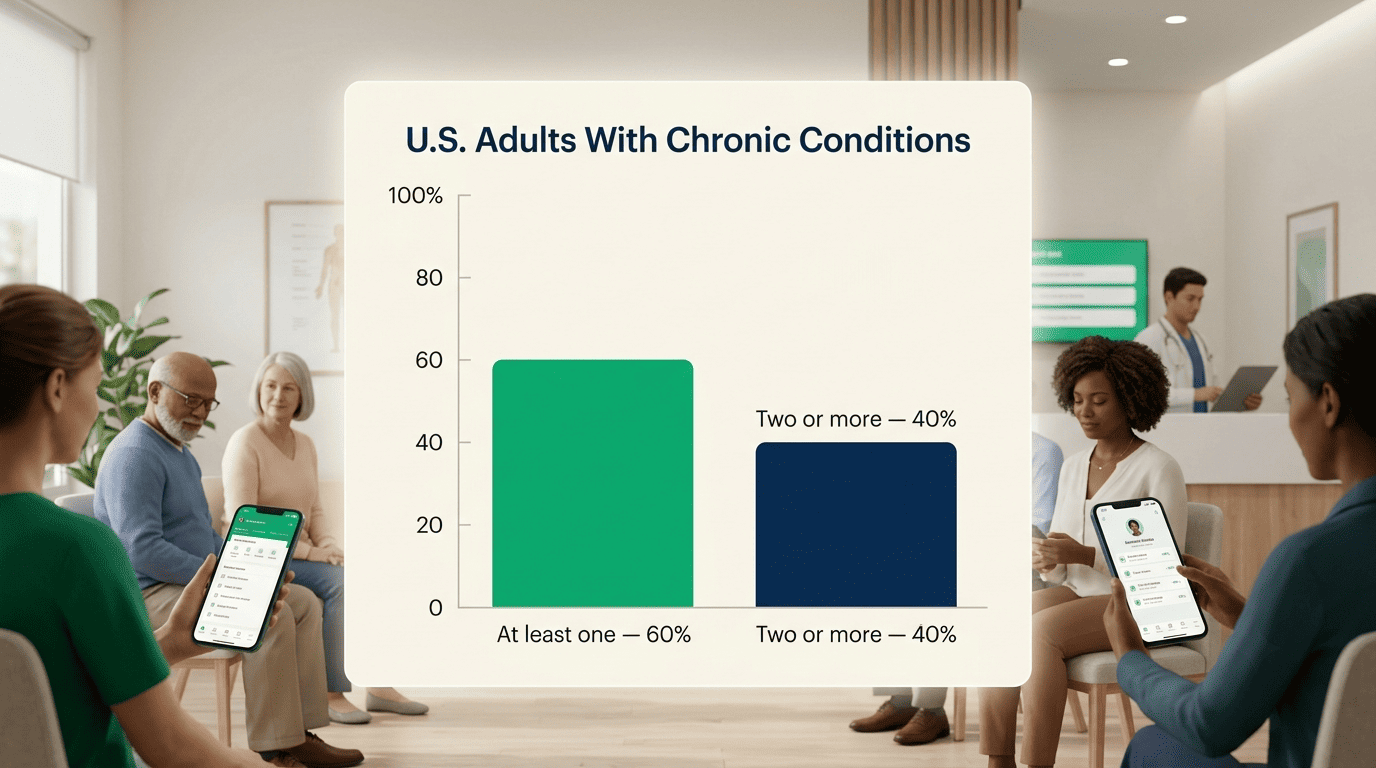
This is also where chronic conditions raise the stakes on getting prep right. Roughly 6 in 10 U.S. adults live with at least one chronic condition, and about 4 in 10 have two or more — meaning many visits already have to cover several threads at once, which is exactly the kind of workload an organized question list and symptom timeline are built to handle.
Step 1 — Build Your Question Checklist With AI
Turning a vague sense of «things I should ask» into an actual list is the single highest-leverage thing an AI chatbot can do before a visit. The American Medical Association (AMA) recommends a direct prompt for this: «What questions should I ask my doctor to better understand this situation?» Feed the chatbot your symptoms, diagnosis, or upcoming procedure, and it returns a starting list you can edit, cut, and reorder.
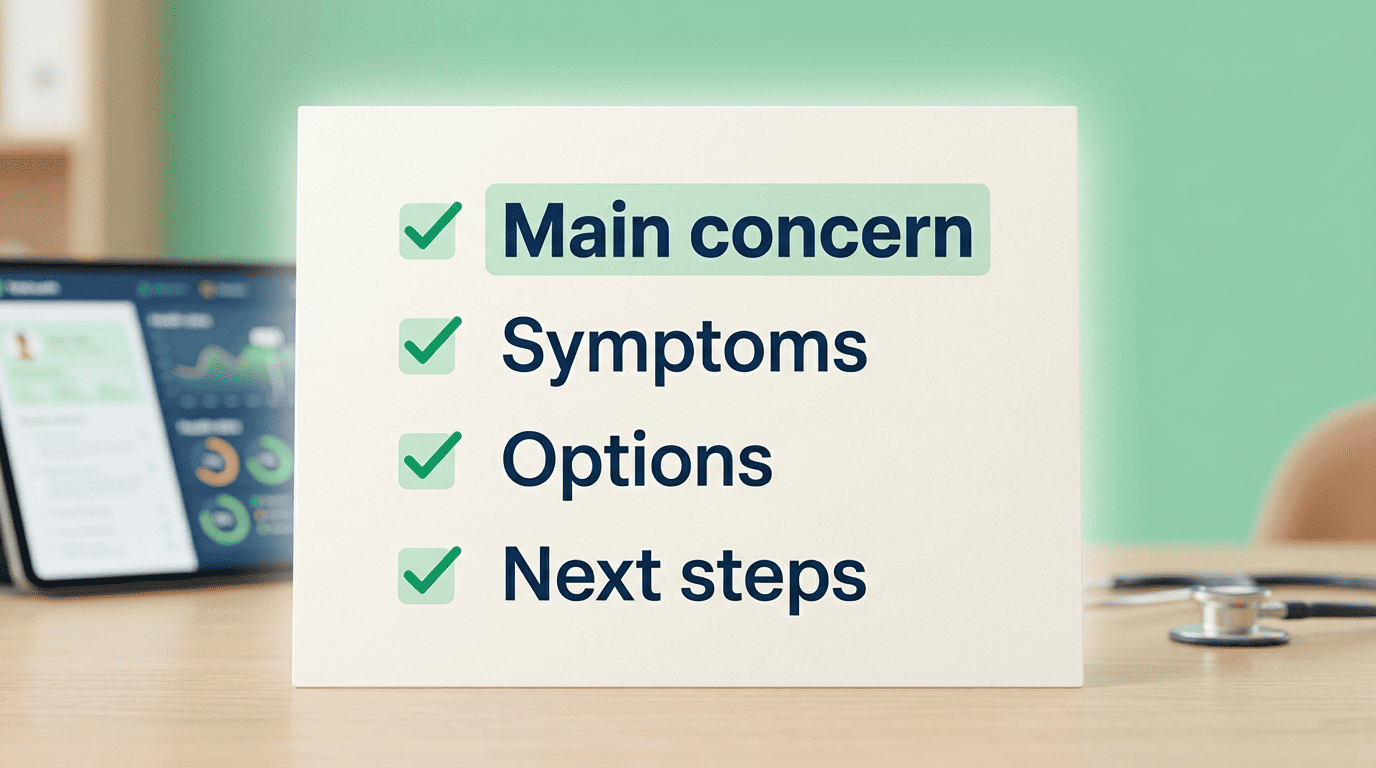
The core prompt, and a closing prompt
Use the AMA prompt above as your opening move, then add a closing prompt near the end of your prep session: «What are the three most important questions I should ask my doctor at my next visit?» Print or save the resulting summary — you want it in front of you at the appointment, not buried in a chat history you’ll have to scroll through in the waiting room. A short prompt set to start with:
- «What questions should I ask my doctor to better understand this situation?»
- «Explain this diagnosis or lab result in plain language.»
- «What are the three most important questions I should ask at my next visit?»
- «How should I prepare for this specific visit? List three ways.»
Turn it into a printable list
For a more structured version of the same idea, AHRQ’s QuestionBuilder app lets you pick from common question categories and generates a printable list — a useful complement to whatever the AI chatbot drafts. Whichever tool you use, prioritize ruthlessly: put your most important question first, not last, since that’s the one most likely to get a real answer before time runs out.
Step 2 — Organize Your Symptom History and Timeline
Doctors ask a fairly consistent set of questions about any new or worsening symptom, and knowing them in advance makes it much easier to prep useful notes. Per the National Institute on Aging (NIH), expect to be asked:
- When the symptom started
- What time of day it happens
- How long it lasts
- How often it occurs
- Whether it’s getting better or worse
- Whether it stops you from doing your usual activities
An AI chatbot is well suited to turning a scattered set of notes — texts to yourself, a symptom diary, half-remembered dates — into a clean answer to each of those points.

The prep prompt
Dr. Adam Rodman, a general internist and AI researcher at Harvard-affiliated Beth Israel Deaconess Medical Center, recommends this kind of pre-visit use — take the notes from your last visit or your recent symptoms (with identifying details removed) and have the chatbot help you get ready. A prompt like «How should I prepare for this visit? List three ways» works well here. Let the AI draft a summary, then edit it yourself — the goal is a document you’d be comfortable reading out loud, not one you take on faith. The NIA’s guide on what to tell your doctor covers the same ground and is worth cross-checking your AI-built summary against.
Step 3 — Know What to Bring: Meds, Records, Screenings
Your full medication list is the item most people get wrong. «Full» means more than your daily prescriptions. It should include:
- Prescription medications, with exact dosages
- Over-the-counter drugs (pain relievers, allergy pills, laxatives)
- Herbal supplements and vitamins
- Eye drops and topical treatments
- Your pharmacy’s phone number
Doctors frequently need to cross-check interactions that only show up when the complete list is visible — a supplement or eye drop left off the list can matter as much as a prescription.
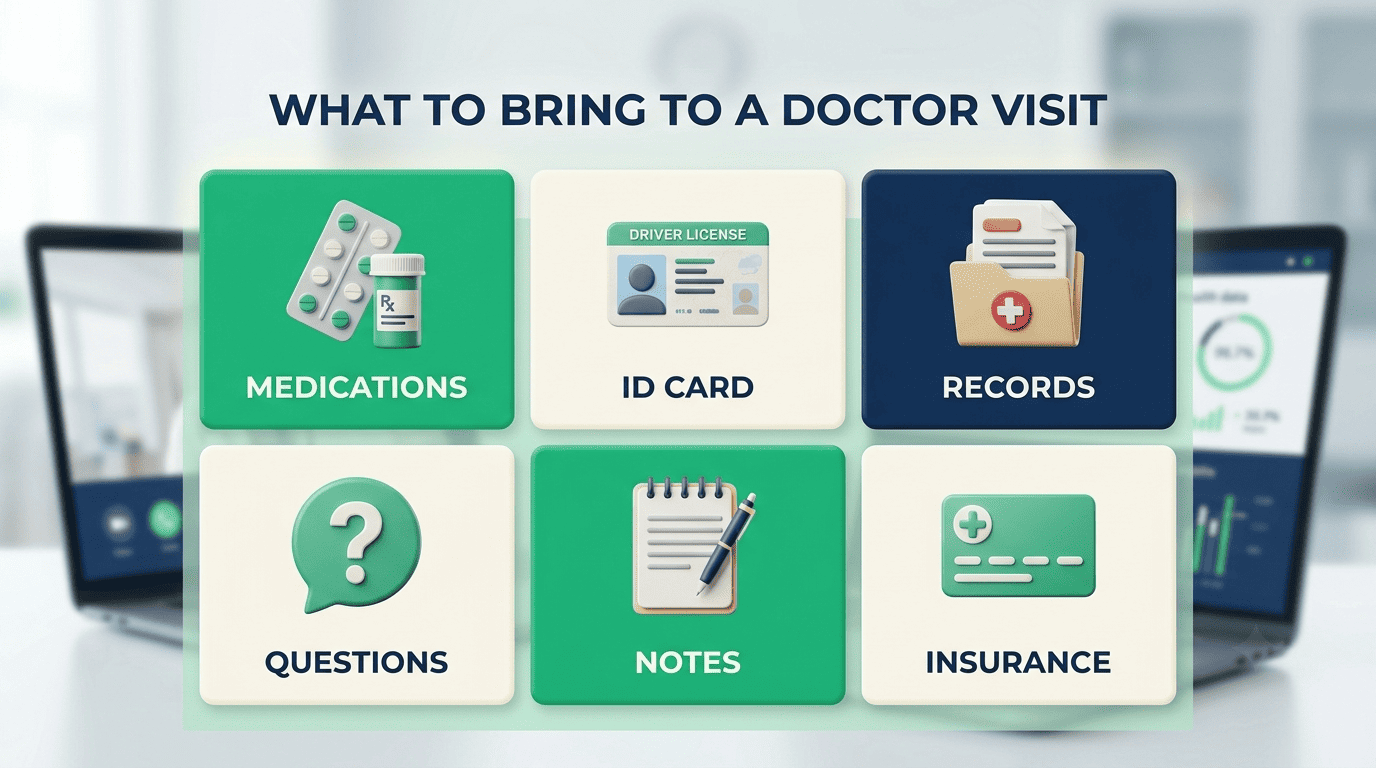
Records and identification matter more than people expect. Bring your insurance card and ID, any relevant medical records or recent test results, and written notes on your symptoms so you’re not reconstructing the timeline from memory in the exam room. If a visit is likely to be complex or emotionally difficult, consider bringing a companion who can take notes or ask a question you forget.
Screenings are worth raising even if the doctor doesn’t bring them up first. An AI chatbot can remind you which age- and gender-appropriate screenings are typically recommended for someone your profile — but it cannot confirm what’s actually due for you; only your doctor, working from your history, can do that. MedlinePlus has a solid overview of how to raise these topics during a visit.
| Bring this | Why it matters |
|---|---|
| Full medication list (Rx, OTC, supplements, vitamins) | Prevents missed drug interactions |
| Insurance card and photo ID | Required for check-in and billing |
| Relevant medical records or test results | Avoids repeat testing, gives context |
| Prioritized question list | Keeps the most important concern from getting cut |
| Symptom notes / AI-built timeline | Speeds up history-taking |
| Companion (optional) | Extra set of ears, takes notes |
Step 4 — Safe Prompts and What NEVER to Share
Not everything that’s safe to tell your doctor in person is safe to type into an AI chatbot. The distinction comes down to identifiability: general health details are fine, but anything that could be traced back to you as a specific individual should stay out of the conversation.
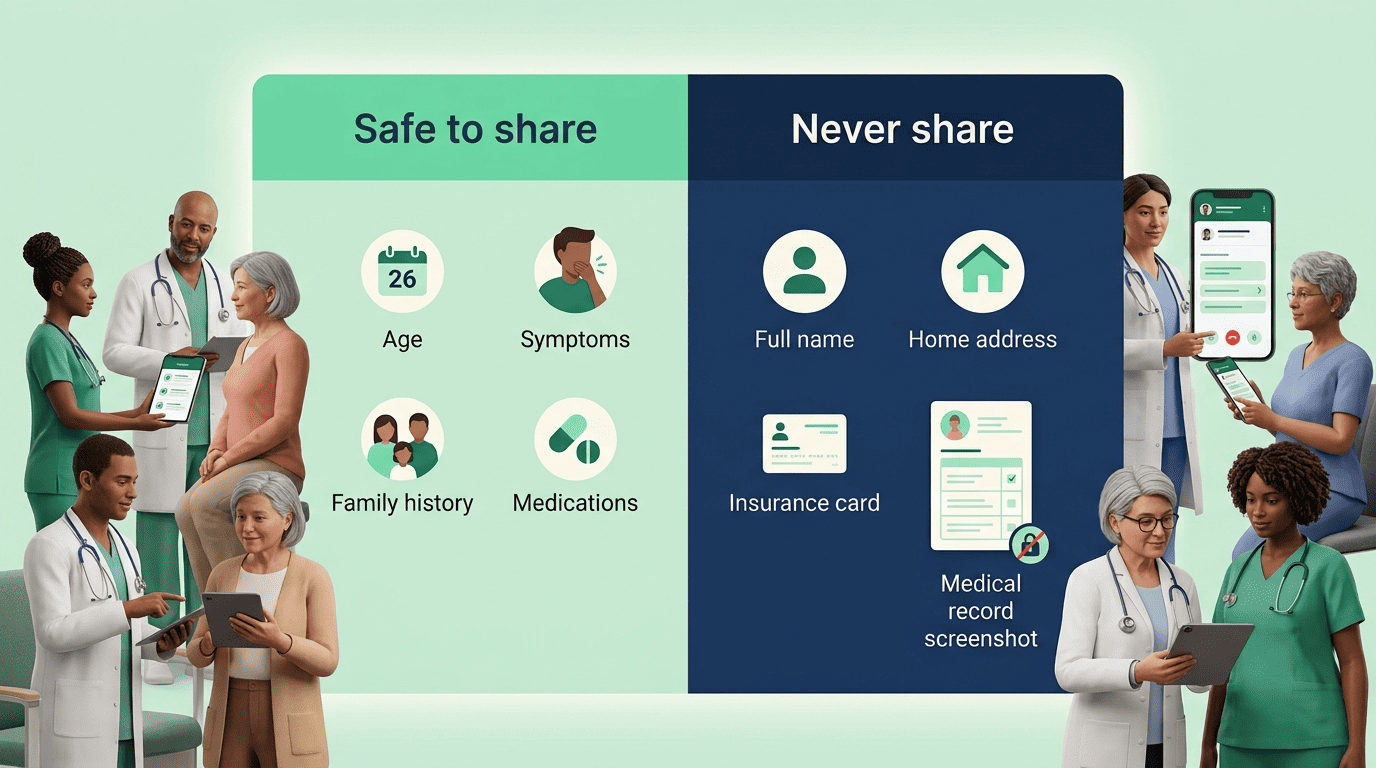
The safest habit is to treat an AI chatbot like a stranger on a park bench who happens to know a lot about medicine: useful for a general conversation about symptoms and conditions, but not someone you’d hand your insurance card or home address to. If a prompt would let a company (or, in the event of a data breach, a stranger) connect a health detail back to your identity, leave it out and describe the situation in general terms instead.
Safe to share vs. never share
| Safe to share with an AI chatbot | Never share with an AI chatbot |
|---|---|
| Age and gender | Full name |
| Symptoms and conditions | Home address |
| Family medical history | Insurance information |
| Current medications | Screenshots of medical records |
Why: it’s not HIPAA-protected
Health information typed into a general-purpose AI chatbot is not covered by HIPAA the way records held by your doctor’s office are — protection there depends entirely on the company’s own privacy policy, not federal medical-privacy law. Researchers at Stanford’s Institute for Human-Centered AI have made a related point about anonymized health data more broadly: removing obvious identifiers is not the same thing as making data truly anonymous, since combined details can still be re-identified. Treat anything you type into a chatbot as potentially retained, and keep it limited to the «safe» column above.
Step 5 — Trust but Verify: AI Prepares, the Doctor Decides
Harvard Health Publishing frames AI chatbot use in medicine with a simple stoplight system, and it’s a useful mental model to carry into your own prep sessions.
AI is not a replacement for health care professionals.
Harvard Health Publishing
That line sums up how every authoritative source treats AI chatbots in this context: useful for background and preparation, never a substitute for a clinician’s exam, history, and judgment. The stoplight system below is one practical way to keep that distinction straight while you’re actually typing prompts.
The stoplight rule
| Zone | What it covers | What to do |
|---|---|---|
| Green | General health info, explaining lab results, visit prep | Safe to use freely |
| Yellow | New or changing symptoms | Use as a first step only, then contact a clinician |
| Red | Treatment decisions, medication choices | Don’t act on AI output — this is your doctor’s call |
Watch for sycophancy and phrasing effects
AI chatbots can be sycophantic — they sometimes mirror the answer they sense you want rather than giving a neutral one. The fix is to ask the same question three different ways and compare the answers rather than trusting the first response. Wording also changes what you get back: researchers at Oxford found that describing a headache as «the worst headache of my life» versus «a terrible headache» produced different recommendations from AI tools, with one framing pointing toward the ER and the other suggesting rest at home. The practical takeaway is to bring the AI’s summary to your doctor rather than acting on it yourself — and to remember that a possible medical emergency means calling 911, and a mental-health crisis means calling or texting 988.